
Sheet music from Ableton, live on every player’s tablet
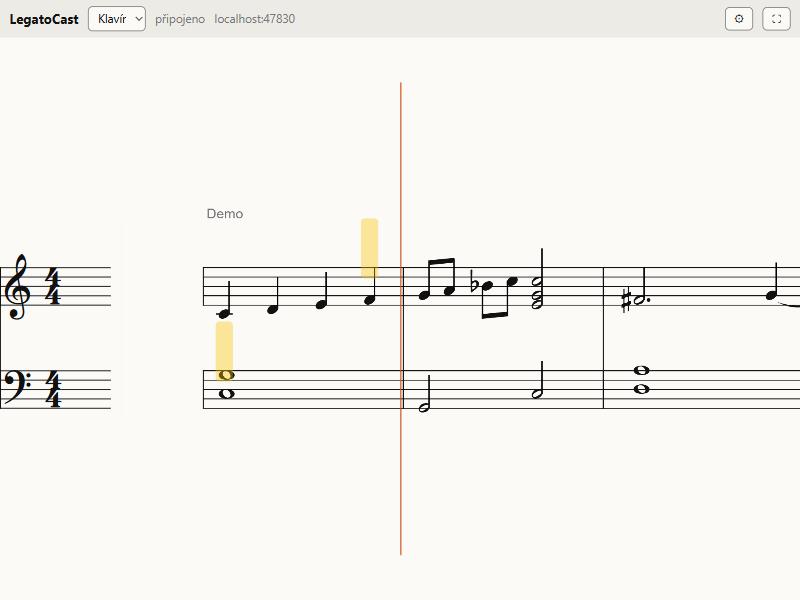
Put LegatoCast on a track and your MIDI turns into readable notation. Notes scroll right to left with the tempo, the current note is highlighted in the middle, and you see bars ahead.
Windows 11 and Android. The client app is free.
How it works
Install the Manager
LegatoCast Manager installs the plugin and a small Remote Script on your Ableton PC. Nothing else to configure.
Put the plugin on a track
Any track, or several. Each one is then offered by its name.
Open the client
On a tablet, phone or second PC. It finds the transmitter on your network, you pick a track and play.
What LegatoCast does
Scrolls with the tempo
Current note in the middle, and you choose how many bars before and after. Smooth motion in sync with Ableton.
Edits show instantly
Stop, fix a note in the clip and the client shows it right away. No export, no refresh.
Many tracks, many players
Every musician picks their own track on their own device, by its Ableton name.
Piano, organ, transposition
Piano on a grand staff, organ on three staves with pedal. Clarinet, trumpet, sax or horn are transposed automatically.
Lyrics and cues
Locators like Verse and Chorus, track notes and song lyrics right above the music.
Your size, your colours
Larger notes for the stage, light or dark palettes, rotation. The client remembers your settings.
Engraving conventions
Key signatures, ties, beams, rests and voices the way an experienced musician expects.
No internet needed on stage
Everything runs on your own network: Wi-Fi, cable or USB. The licence works offline for months.
Who it is for
- Live bands playing with Ableton on stage
- Churches and choirs: organist, pianist and band from one song
- Teachers and students who want to see and practise a piece
- Composers and producers handing parts to musicians
- Musicals and theatre with many players from one project
Simple pricing, no subscription
one-time, VAT included
- VST3 plugin for Ableton Live
- 3 activations (e.g. studio, stage laptop and a spare)
- Free client app on unlimited devices
- Updates within version 1
- Release a computer yourself in your account
Payment and invoicing are handled by our reseller (Merchant of Record), who pays VAT in your country.
FAQ
Do I need to be technical?
No. If you can read music, you are set. The Manager installs everything and the client finds your Ableton computer by itself. The only manual step is enabling LegatoCast once in Ableton’s preferences, and the help shows it with a picture.
Do I need Ableton Live Suite or Max for Live?
No. LegatoCast is a regular VST3 plugin with a small Remote Script and works in Intro, Standard and Suite.
Where can I read the music?
On an Android tablet or phone, on a second Windows PC, or in a window on the same computer. The client app is free on any number of devices.
Do I need internet on stage?
No. Everything runs on your local network: Wi-Fi, your own router, a cable or a USB cable to the tablet. The licence works offline for months.
What if I change computers?
A licence has 3 activations. Release the old computer with one click in your account and activate the new one in the Manager.
How is the demo different?
The demo is a separate free build with limited features. We will publish exactly what is included together with the demo. After purchase, the Manager installs the full version next to it.
Is it a subscription?
No. You pay once and the licence is yours. Updates within version 1 are free.
What about refunds?
The refund policy will be published in the terms before sales open.